
7.7 KiB
7.7 KiB
CMDR Joystick 25
USB HID joystick firmware + hardware: 2 hall‑effect gimbals, 2 physical hat switches, and a 5x5 button matrix (plus 2 extra buttons). The firmware exposes 7 HID axes (X, Y, Z, Rx, Ry, Rz, Slider), 32 buttons and one 8‑way HAT.
Layout
HW Button index map:
---------------------------------------------------------------
|  0 L|  1 U| 25 U |        |  2  |        | 26 U |  4 U|  3 L|
---------------------------------------------------------------
|     |  5  |  6  |  7  |             | 12  | 11  | 10  |     |
|                                                             |
|                 |  8  |             | 13  |                 |
|                 |  9  |             | 14  |                 |
|      X1/Y1                                       X2/Y2      |
|                 | 16  |             | 21  |                 |
|           | 19  | 15  | 17  | | 24  | 20  | 22  |           |
|                 | 18  |             | 23  |                 |
---------------------------------------------------------------

USB HID joystick map :
---------------------------------------------------------------
| Fn L| B19 U| B7 U|        | B32 |         | B8 U| B1 U| B2 L|
---------------------------------------------------------------
|     | B5 |  B14 | B9  |             | B10 | B15 | B6 |      |
|                                                             |
|                 | B13 |             | B17 |                 |
|                 | B16 |             | B18 |                 |
|      X1/Y1                                       X2/Y2      |
|                 | H1U |             | H2U |                 |
|           | H1L | B11 | H1R | | H2L | B12 | H2R |           |
|                 | H1D |             | H2D |                 |
---------------------------------------------------------------

USB HID joystick map (Fn):
---------------------------------------------------------------
| Fn L| B21 U| B27 U|       | B32 |         | B8 U| B3 U| B4 L|
---------------------------------------------------------------
|     | TH |  B22 | B26 |             | B28 | B24 | B23 |     |
|                                                             |
|                 | B29 |             | B31 |                 |
|                 | B16 |             | B18 |                 |
|      X1/Y1                                       X2/Y2      |
|                 | H3U |             | H4U |                 |
|           | H3L | B20 | H3R | | H4L | B25 | H4R |           |
|                 | H3D |             | H4D |                 |
---------------------------------------------------------------

Config Layer (holding CONFIG button)
---------------------------------------------------------------
|BOOT L| CAL U|           | CONFIG |              |  -  |  -  |
---------------------------------------------------------------
|     |  -  |  -  |  -  |             |  -  |  -  |  -  |     |
|                                                             |
|                 |  -  |             |  -  |                 |
|                 |  -  |             |  -  |                 |
|        -/-                                        -/-       |
|                 |  -  |             |  -  |                 |
|           |  -  |  -  |  -  | |  -  |  -  |  -  |           |
|                 |  -  |             |  -  |                 |
---------------------------------------------------------------
Features
- Ergonomic design (low profile)
- Hall‑effect gimbals (FrSky M7/M10)
- USB HID joystick device
- 7 axes: X, Y, Z, Rx, Ry, Rz, Slider
- 32 buttons
- 1× 8‑way HAT
- Advanced input pipeline
- Digital smoothing for stable axes
- Per‑axis calibration (min/center/max) with EEPROM persistence
- Optional exponential response curves (LUT based)
- Throttle hold (capture + remap around center)
- Virtual throttle mode (map right‑X to Slider; disable Z)
- Status LED (WS2812 via PIO) for mode/health indication
Hardware
- 2x FrSky M7 or M10 gimbals M7 datasheet
- 7x Kailh choc low profile switches Brown
- 8x Cherry MX switches Brown
- 2x Miniature Toggle Switch (M6 shaft, 7-8mm wide body. Ex Apem 5636) Apem 5000 series
- 2x Alpine RKJXM1015004 hat switches pdf
- 1x Bottom case (3D printed)
- 1x Top plate (3D printed)
- 2x Hat swith top (3D printed) stl
- 1x Custom PCB (CMDR Joystick 25 rev A)
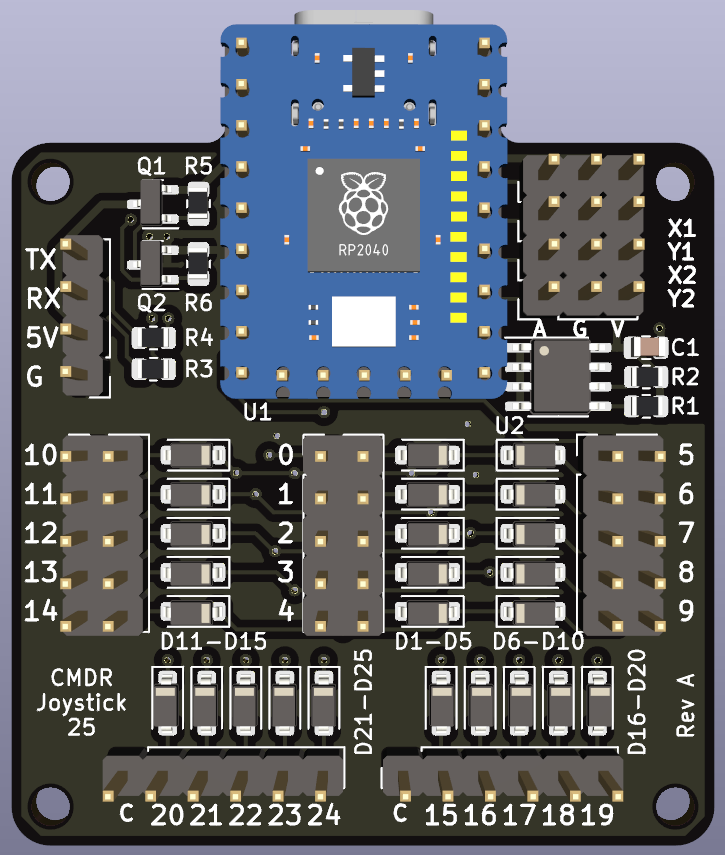
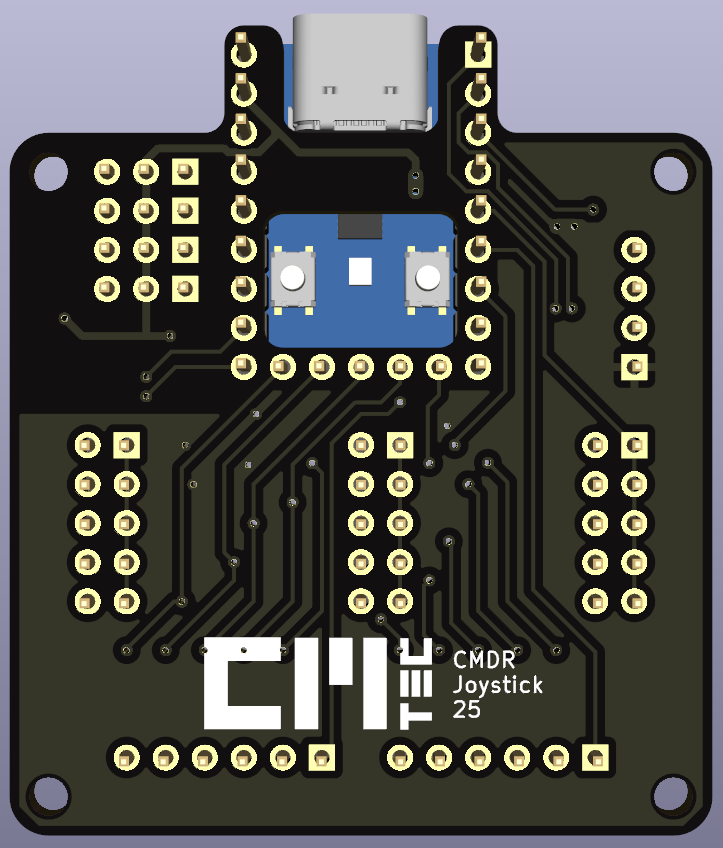

Build, test, and flash (install.sh)
Use the top‑level install.sh to run tests, build, and flash. It handles
prerequisites, target setup, UF2 conversion, and optional SSH deployment.
Common commands
# Run comprehensive tests (host + embedded checks + clippy + release build)
./install.sh test

# Build and flash locally (copies UF2 to RPI-RP2 mass storage)
./install.sh flash --local

# Build and transfer UF2 via SSH to a remote machine
./install.sh flash --ssh --target user@host --mount /Volumes/RPI-RP2

# Clean build artifacts and temporary files
./install.sh clean
Entering bootloader
- Hardware: hold BOOTSEL while plugging USB
- Firmware shortcut (at power‑on): hold the front‑left‑lower button
- In‑firmware combo: Front‑left‑lower + Top‑left‑mode + Top‑right‑mode
References
- rp2040 datasheet: pdf
Calibration
- Center both gimbals.
- Start calibration (LED will flash): press Front‑left‑upper + Top‑left‑mode + Top‑right‑mode.
- Move both gimbals through full travel (all corners).
- Optional: select gimbal mode while calibrating
- M10: press Top‑left‑UP
- M7: press Top‑left‑DOWN
- Save calibration to EEPROM: press the right hat center button.
- Exit calibration: repeat step 2 combination (toggles off).
Notes
- During calibration, min/max are tracked from the smoothed ADC values.
- On mode change (M10/M7) centers are reset from the current position.
Runtime controls
- Throttle hold: press the Top‑left‑mode button to capture the current throttle value
- Press again at center to clear hold
- Virtual throttle mode: press the Top‑right‑mode button to toggle
- Disables Z axis and maps right‑X to the Slider (symmetric around center)
Development and testing
Run unit tests on host (uses std for test modules):
cd rp2040
cargo test --features std
Repo structure
rp2040/src/*.rs: firmware modules (axis, buttons, matrix, calibration, storage, HID)rp2040/memory.x: linker scriptrp2040/uf2conv.py: UF2 converter (alternative to elf2uf2‑rs)install.sh: unified helper to test, build, and flash (local or via SSH)