
5.7 KiB
5.7 KiB
CMDR keyboard 51

Layout
 Layer 0
 --------------------------------------  ------     ------  --------------------------------------
 |  Tab  |  Q  |  W  |  E  |  R  |  T  || Lck |     |PrSrc||  Y  |  U  |  I  |  O  |  P  |   Å   |
 | LCtrl |  A  |  S  |  D  |  F  |  G  ||  M2 |     |  M5 ||  H  |  J  |  K  |  L  |  Ö  |   Ä   |
 | Shift |  Z  |  X  |  C  |  V  |  B  ||  M3 |-----|  M6 ||  N  |  M  | ,;  | .:  | -_  | Shift |
 --------------------| Alt | Fn  | Spc || BSpc| Gui |Enter|| Spc | Fn  |AG+Fn|--------------------
                     ------------------  -----------------  ------------------
 Layer 1 (Fn)
 --------------------------------------  ------     ------  --------------------------------------
 |  Esc  | F1  | F2  | F3  | F4  | F5  ||  M1 |     |  M4 || F6  | F7  | F8  | F9  | F10 |  Del  |
 | LCtrl | 1!  | 2"@ | 3#£ | 4¤$ | 5%  ||  M2 |     |  M5 || 6&  | 7/{ | 8([ | 9)] | 0=} | Enter |
 | Shift | 6&  | 7/{ | 8([ | 9)] | 0=} ||  M3 |-----|  M6 || <>| | ´`± | '*´ | ¨^~ | +?\ | Shift |
 --------------------| Alt | Fn  | Spc || BSpc| Gui |Enter|| Spc | Fn  |AG+Fn|--------------------
                     ------------------  -----------------  ------------------
 Layer 2 (Fn + Fn)
 --------------------------------------  ------     ------  --------------------------------------
 |  Esc  | F11 | F12 | F13 | F14 |     ||  M1 |     |  M4 ||  §  | SLOK|     |     | CpLk|  Del  |
 | LCtrl | F15 | F16 | F17 | F18 | F19 ||  M2 |     |  M5 || Left| Down| Up  |Right|     | Enter |
 | Shift | F20 | F21 | F22 | F23 | F24 ||  M3 |-----|  M6 || Home| PgD | PgU | End | Ins | Shift |
 --------------------| Alt | Fn  | Spc || BSpc| Gui |Enter|| Spc | Fn  |AG+Fn|--------------------
                     ------------------  -----------------  ------------------
Features
- 51 keys "Split" keyboard layout. 36 finger buttons and 9 thumb buttons and 6 function buttons.
- Extreme low profile (only one pcb).
- Cost efficient solution with one pcb and one 3D printed cover.
- Function keys with total of three layer support (Primary + 2fn layers).
- Status indication -
- LED green = Normal mode
- LED green flashing = waiting for USB enumeration
- LED blue on = sticky lock initiated
- LED blue flashing = sticky lock activated
- LED red = error
- LED red flashing = Caps Lock activated
Build environment rp2040 Zero
Rust embedded, rp2040 HAL
- Cargo (cargo.toml)
- Flashing via rp2040 USB bootloader
- Pressing reset/boot button on rp2040 Zero board
- Pressing upper left corner on the keyboard when connecting the usb cable
Hardware
- 1x rp2040 Zero
- 45x Cherry MX compatible switches
- 6x Kailh Choc low profile switches
- 51x 1N4148 diodes
- 1x PCB Gerber files
- 1x MCU cover (optional)
- 1x 6x3 Cherry MX mounting jig (optional) STL file
CMDR keyboard 42
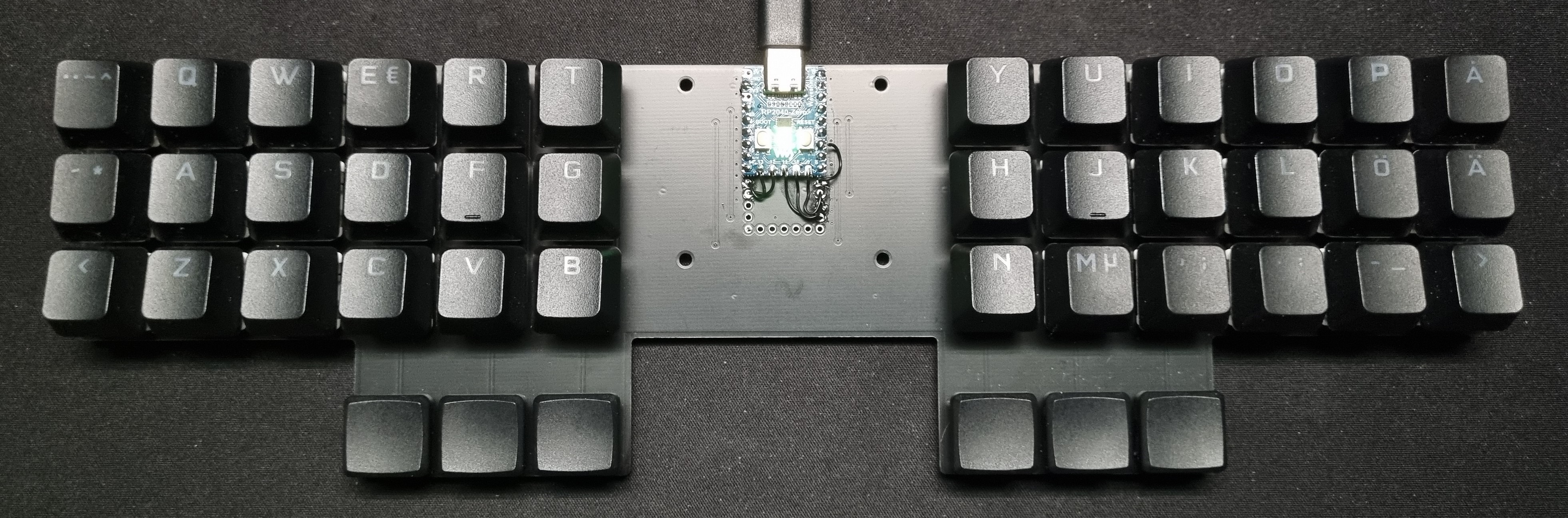
Layout
 Layer 0
 ---------------------------------------      ---------------------------------------
 |  Tab  |  Q  |  W  |  E  |  R  |  T  |      |  Y  |  U  |  I  |  O  |  P  |   Å   |
 | LCtrl |  A  |  S  |  D  |  F  |  G  |      |  H  |  J  |  K  |  L  |  Ö  |   Ä   |
 | Shift |  Z  |  X  |  C  |  V  |  B  |      |  N  |  M  | ,;  | .:  | -_  | Shift |
 --------------------| Alt | Fn  | Spc |      |Enter| Fn  |AG+Fn|--------------------
                     -------------------      -------------------
 Layer 1 (Fn)
 ---------------------------------------      ---------------------------------------
 |  Esc  |  F1 |  F2 |  F3 |  F4 |  F5 |      |  F6 |  F7 |  F8 |  F9 | F10 |  BSpc |
 | LCtrl | 1!  | 2"@ | 3#£ | 4¤$ | 5%  |      | 6&  | 7/{ | 8([ | 9)] | 0=} | Enter |
 | Shift | 6&  | 7/{ | 8([ | 9)] | 0=} |      | <>| | ´`± | '*´ | ¨^~ | +?\ | Shift |
 --------------------| Alt | Fn  | Spc |      | BSpc| Fn  |AG+Fn|--------------------
                     -------------------      -------------------
 Layer 2 (Fn + Fn)
 ---------------------------------------      ---------------------------------------
 |  Esc  | F11 | F12 | F13 | F14 |     |      |  §  | SLOK| Gui |     | CpLk|  BSpc |
 | LCtrl | F15 | F16 | F17 | F18 | F19 |      | Left| Down| Up  |Right| Del | Enter |
 | Shift | F20 | F21 | F22 | F23 | F24 |      | Home| PgD | PgU | End | Ins | Shift |
 --------------------| Alt | Fn  | Spc |      | BSpc| Fn  |AG+Fn|--------------------
                     -------------------      -------------------
Features
- 42 keys "Split" keyboard layout. 36 finger buttons and 6 thumb buttons.
- Extreme low profile (only one pcb).
- Cost efficient solution with one pcb and one 3D printed cover.
- Function keys with total of three layer support (Primary + 2fn layers).
- Status indication -
- LED green = Normal mode
- LED green flashing = waiting for USB enumeration
- LED blue on = sticky lock initiated
- LED blue flashing = sticky lock activated
- LED red = error
- LED red flashing = Caps Lock activated
Build environment rp2040 Zero
Rust embedded, rp2040 HAL
- Cargo (cargo.toml)
- Flashing via rp2040 USB bootloader
- Pressing reset/boot button on rp2040 Zero board
- Pressing upper left corner on the keyboard when connecting the usb cable
Hardware
- 1x rp2040 Zero (please see patch instruction)
- 36x Cherry MX compatible switches
- 6x Kailh Choc low profile switches
- 42x 1N4148 diodes
- 1x PCB Gerber files (please see patch instructions)
- 1x MCU cover (optional) STL file
- 1x 6x3 Cherry MX mounting jig (optional) STL file