
CMDR keyboard 51
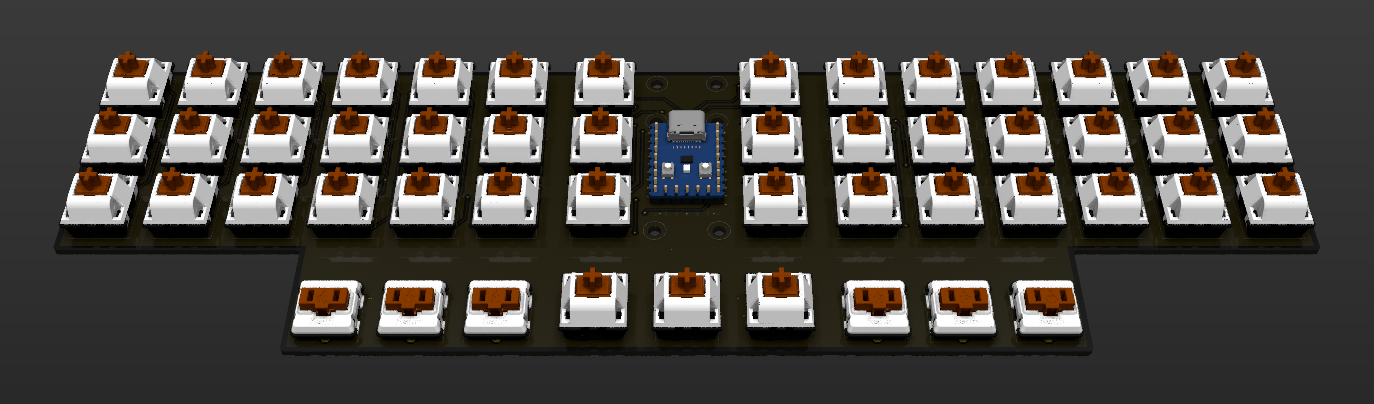
Layout
 Layer 0
 --------------------------------------  ------     ------  --------------------------------------
 |  Tab  |  Q  |  W  |  E  |  R  |  T  || Lck |     |PrSrc||  Y  |  U  |  I  |  O  |  P  |   Å   |
 | LCtrl |  A  |  S  |  D  |  F  |  G  ||  M2 |     |  M5 ||  H  |  J  |  K  |  L  |  Ö  |   Ä   |
 | Shift |  Z  |  X  |  C  |  V  |  B  ||  M3 |-----|  M6 ||  N  |  M  | ,;  | .:  | -_  | Shift |
 --------------------| Alt | Fn  | Spc || BSpc| Gui |Enter|| Spc | Fn  |AG+Fn|--------------------
                     ------------------  -----------------  ------------------
 Layer 1 (Fn)
 --------------------------------------  ------     ------  --------------------------------------
 |  Esc  | F1  | F2  | F3  | F4  | F5  ||  M1 |     |  M4 || F6  | F7  | F8  | F9  | F10 |  Del  |
 | LCtrl | 1!  | 2"@ | 3#£ | 4¤$ | 5%  ||  M2 |     |  M5 || 6&  | 7/{ | 8([ | 9)] | 0=} | Enter |
 | Shift | 6&  | 7/{ | 8([ | 9)] | 0=} ||  M3 |-----|  M6 || <>| | ´`± | '*´ | ¨^~ | +?\ | Shift |
 --------------------| Alt | Fn  | Spc || BSpc| Gui |Enter|| Spc | Fn  |AG+Fn|--------------------
                     ------------------  -----------------  ------------------
 Layer 2 (Fn + Fn)
 --------------------------------------  ------     ------  --------------------------------------
 |  Esc  | F11 | F12 | F13 | F14 |     ||  M1 |     |  M4 ||  §  | SLOK|     |     | CpLk|  Del  |
 | LCtrl | F15 | F16 | F17 | F18 | F19 ||  M2 |     |  M5 || Left| Down| Up  |Right|     | Enter |
 | Shift | F20 | F21 | F22 | F23 | F24 ||  M3 |-----|  M6 || Home| PgD | PgU | End | Ins | Shift |
 --------------------| Alt | Fn  | Spc || BSpc| Gui |Enter|| Spc | Fn  |AG+Fn|--------------------
                     ------------------  -----------------  ------------------
Features
- 51 keys "Split" keyboard layout. 36 finger buttons and 9 thumb buttons and 6 function buttons.
- Extreme low profile (only one pcb).
- Cost efficient solution with one pcb and one 3D printed cover.
- Function keys with total of three layer support (Primary + 2fn layers).
- Status indication -
- LED green = Normal mode
- LED green flashing = waiting for USB enumeration
- LED blue on = sticky lock initiated
- LED blue flashing = sticky lock activated
- LED red = error
- LED red flashing = Caps Lock activated
Build environment rp2040 Zero
Rust embedded, rp2040 HAL
- Cargo (cargo.toml)
- rustup target add thumbv6m-none-eabi
- cargo install elf2uf2-rs --locked
- Flashing via rp2040 USB bootloader
- Pressing reset/boot button on rp2040 Zero board
- Pressing upper left corner on the keyboard when connecting the usb cable
Hardware
- 1x rp2040 Zero
- 45x Cherry MX compatible switches
- 6x Kailh Choc low profile switches
- 51x 1N4148 diodes
- 1x PCB Gerber files
- 1x MCU cover (TBD)
- 1x 6x3 Cherry MX mounting jig (optional) STL file
CMDR keyboard 42
This HW(PCB) was original made for use with the TeensyLC module and is reused by patching it to fit the rp2040-zero module
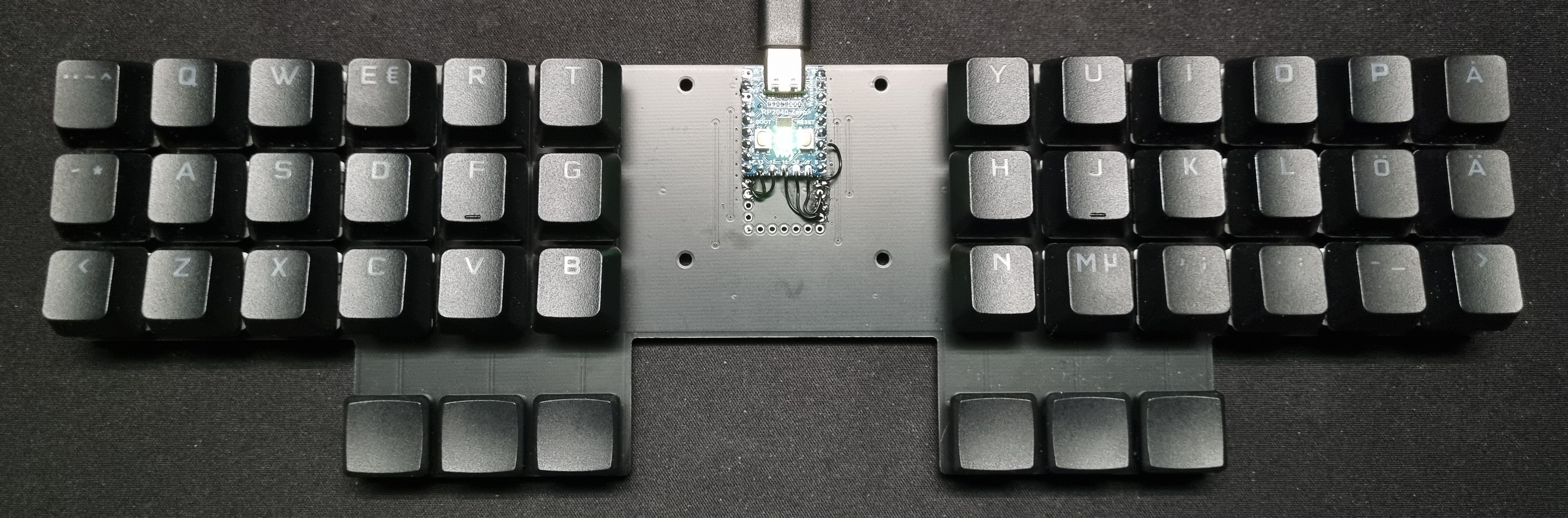
Layout
 Layer 0
 ---------------------------------------      ---------------------------------------
 |  Tab  |  Q  |  W  |  E  |  R  |  T  |      |  Y  |  U  |  I  |  O  |  P  |   Å   |
 | LCtrl |  A  |  S  |  D  |  F  |  G  |      |  H  |  J  |  K  |  L  |  Ö  |   Ä   |
 | Shift |  Z  |  X  |  C  |  V  |  B  |      |  N  |  M  | ,;  | .:  | -_  | Shift |
 --------------------| Alt | Fn  | Spc |      |Enter| Fn  |AG+Fn|--------------------
                     -------------------      -------------------
 Layer 1 (Fn)
 ---------------------------------------      ---------------------------------------
 |  Esc  |  F1 |  F2 |  F3 |  F4 |  F5 |      |  F6 |  F7 |  F8 |  F9 | F10 |  BSpc |
 | LCtrl | 1!  | 2"@ | 3#£ | 4¤$ | 5%  |      | 6&  | 7/{ | 8([ | 9)] | 0=} | Enter |
 | Shift | 6&  | 7/{ | 8([ | 9)] | 0=} |      | <>| | ´`± | '*´ | ¨^~ | +?\ | Shift |
 --------------------| Alt | Fn  | Spc |      | BSpc| Fn  |AG+Fn|--------------------
                     -------------------      -------------------
 Layer 2 (Fn + Fn)
 ---------------------------------------      ---------------------------------------
 |  Esc  | F11 | F12 | F13 | F14 |     |      |  §  | SLOK| Gui |     | CpLk|  BSpc |
 | LCtrl | F15 | F16 | F17 | F18 | F19 |      | Left| Down| Up  |Right| Del | Enter |
 | Shift | F20 | F21 | F22 | F23 | F24 |      | Home| PgD | PgU | End | Ins | Shift |
 --------------------| Alt | Fn  | Spc |      | BSpc| Fn  |AG+Fn|--------------------
                     -------------------      -------------------
Features
- 42 keys "Split" keyboard layout. 36 finger buttons and 6 thumb buttons.
- Extreme low profile (only one pcb).
- Cost efficient solution with one pcb and one 3D printed cover.
- Function keys with total of three layer support (Primary + 2fn layers).
- Status indication -
- LED green = Normal mode
- LED green flashing = waiting for USB enumeration
- LED blue on = sticky lock initiated
- LED blue flashing = sticky lock activated
- LED red = error
- LED red flashing = Caps Lock activated
Build environment rp2040 Zero
Rust embedded, rp2040 HAL
- Cargo (cargo.toml)
- rustup target add thumbv6m-none-eabi
- cargo install elf2uf2-rs --locked
- Flashing via rp2040 USB bootloader
- Pressing reset/boot button on rp2040 Zero board
- Pressing upper left corner on the keyboard when connecting the usb cable
Hardware
- 1x rp2040 Zero
- 36x Cherry MX compatible switches
- 6x Kailh Choc low profile switches
- 42x 1N4148 diodes
- 1x PCB Gerber files (please see patch instructions)
- 1x MCU cover STL file
- 1x 6x3 Cherry MX mounting jig (optional) STL file